
Umbraco AI gives you the governance to run AI safely and none of the AI itself. No prompts, no agents, nothing in the Copilot sidebar until you build it. Here is that build, in order.
"Set up native one-click prompts for meta text."
umbraco.com/ai
Umbraco AI - where to start!
A client sends you a link about Umbraco AI and asks what it would cost to turn it on.
The honest answer is an hour to install (and a day or two after that). The second number is the one that matters, as Umbraco AI does not ship with any AI in it - you get a blank canvas and that's where you come in.
Install the package on a clean Umbraco 17/18 site, add a provider, start it up. Your editors get a new AI section, an empty Copilot sidebar and nothing they can do in either. No meta description button, no summarise, no translate, no rewrite, not one prompt, not one agent - so whats going on?
That is an architectural choice rather than an unfinished product, and we think it's the right one. Umbraco shipped the mechanism to run AI safely and left the content to you. But anyone expecting a five minute install to produce a working feature is going to be disappointed, and anyone who quotes the job on that basis is going to lose money on it.
Here is the configuration, in the order it has to happen. The version floor the documentation gets wrong. The security advisory to check before you configure anything else. Above all, the nine things you build in the back office, and why two of them save the client real money. And the trap that will cost you an hour if you hit it cold.
First, check it yourself
Umbraco's own marketing says you can "set up native one-click prompts for meta text". The verb is doing a lot of work in that sentence.
The documentation is blunter. Umbraco.AI does not include SEO-style prompts such as alt text or meta description generation. You create and manage those prompt templates yourself. The framework is there. The content is not.
Same story with the Copilot. The sidebar exists in Content and Media, but it stays empty until an administrator creates an agent and ticks it into the copilot surface. Until then it is a panel with nothing behind it.
Umbraco AI is a platform, not a feature pack. Once you accept that, the rest of it makes sense.
Why HQ built it this way
Shipping default prompts means shipping opinions about tone, length, language and what is safe to automate. Those opinions would be wrong for most sites and actively harmful on some.
So instead of prompts, Umbraco shipped the machinery to run them safely: guardrails with pre and post generate phases, audit logging with token counts per user and per model, version history with rollback on connections, profiles, contexts, prompts and agents, three tiers of tool permissions with user group overrides, and an evaluation framework with seven graders.
That last one is worth stopping on. Practically no CMS ships evals. Umbraco ships them in the core package with no extra install, and almost nobody has noticed.
The trade is deliberate. You get the safety rails, you bring the content.
Before you install: the version floor
The docs say "Umbraco CMS 17.1 or later". That is wrong for every currently shipping package, and the nuspec is the source of truth.
Umbraco.AI.Startup 17.3.1 requires Umbraco.Cms.Core [17.5.0, 17.999.999). The 18.x line requires 18.0.0. Umbraco Automate needs 17.4.0, so if you are putting both on the same site your real floor is 17.5.0.
Everything targets net10.0. That means v13, v15 and v16 are structurally excluded and always will be. If your client is on 13, this is an upgrade conversation, and they have until 14 December before it goes end of life.
The packages
Package majors track the CMS major. Pick a line and keep everything on it.
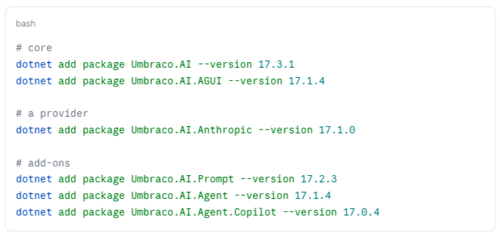
One thing to do before anything else. Umbraco.AI.Agent must be 17.1.4 or 18.1.4 or higher. Advisory GHSA-q88r-pcr9-7r2x, published 18 August 2026, affected 1.6.0 through 18.1.3 and allowed uploaded files to be downloaded with no authentication and no ownership check. That is nearly the whole product history, and there is no workaround. If you have inherited a site with this on it, check the version first and configure second.
Step one: secrets, before you touch the back office
Do not paste an API key into the connection form on a real site. Put it in configuration and reference it.
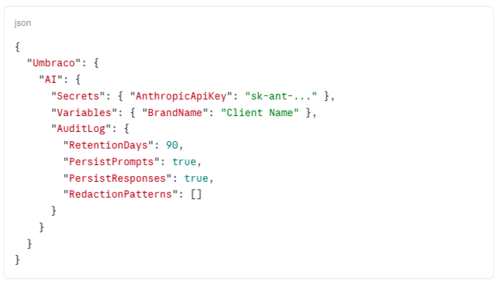
Then in the connection form, the key field gets the literal string $Umbraco:AI:Secrets:AnthropicApiKey.
Three things worth knowing about how that resolves. Resolution is default-deny: only the Secrets and Variables prefixes work, and anything else needs adding to AllowedConfigurationKeyPrefixes, which is appsettings-only and not editable from the back office. A value under Secrets can only be referenced from a field the system already treats as sensitive, so referencing a secret from an ordinary field fails rather than leaking. And matching is segment-aware, so Umbraco:AI:Secrets matches ...:Secrets:AnthropicApiKey but not ...:SecretsBackup:Anything.
It is a well-designed bit of plumbing and it moves cleanly between environments.
Note the two audit defaults above, because they ship wrong for most sites. Retention is 14 days out of the box. Prompts and responses are both persisted in full and RedactionPatterns is empty. So by default the site keeps every prompt and every response for a fortnight and redacts nothing. Raise the retention, populate the patterns, and tell the client in writing what is being stored. They will not have thought about it.
Step two: connection
Settings, AI, Connections. Pick the provider, drop in the config reference, and use Test Connection before you move on.
Deactivate connections rather than deleting them. Deleting one breaks every profile that depends on it.
Step three: two profiles, not one
A profile is a connection plus model settings. Create two.
The workhorse, on a Sonnet-class model, temperature around 0.4, for the actual work.
Then a second one on the cheapest fast model you have access to, and set it as ClassifierChatProfileId in Settings. When more than one agent is attached to the Copilot surface, Copilot runs a classifier to decide which one handles the prompt. That call returns a single GUID. Paying Sonnet rates for it is money on fire, and it is the single easiest cost saving in the whole product.
Step four: context, which is where the quality comes from
A context is a collection of resources injected into the system message. This is where the client's money goes and it is the difference between output that sounds like them and output that sounds like a chatbot.
Build a brand voice context from their actual tone of voice document, not from a paragraph you wrote in ten minutes.
Resources sort by SortOrder and inject in one of two modes. Always concatenates straight into the system prompt. OnDemand exposes the resource as a tool the model calls when it decides it needs it. Voice rules go on Always. Reference material, product data, anything long, goes on OnDemand so you are not paying for it on every request.
If different sections of the site need different voices, create a Data Type from Uai.ContextPicker and put it on the relevant document types. It walks up the content tree to the first ancestor with a value, so you set it once on a section root and it inherits down. Content beats profile in the resolution order.
Step five: the prompt library
Six or seven prompts covers most editorial work. Ours are meta description, SEO title, page summary, tighten this, plain English, three heading options, and social post.
Prompts auto-register as property actions on Textstring, Textarea, Rich Text, Markdown and Block List, so once they exist editors find them without training.
Two behaviours to know before you write them. On Rich Text, a prompt run with a selection captures the selected text and replaces it with the response. Run without a selection and it uses the whole editor content and appends the response at the end. Editors will discover the second one by accident, so mention it.
And prompts that return options rather than overwriting get used more. "Three heading options" gets adopted; "rewrite this heading" gets distrusted.
Step six: an agent
AI, Agents. One standard agent, attached to the workhorse profile, ticked into the copilot surface.
Without this the Copilot sidebar shows nothing at all, which is the single most common "Umbraco AI is broken" report.
Step seven: guardrails
Attach them to both the profile and the agent. Two phases, PreGenerate and PostGenerate. Three actions, Block, Redact and Warn, with precedence Block, then Redact, then Warn. Three built-in evaluators: contains, regex and llm-judge.
Two documented degradations you should not design around. Post-generate Redact silently drops to Warn during streaming, because the chunks have already been sent and cannot be recalled. And llm-judge can never redact at all, in any mode, because it cannot identify text positions.
So if a client needs something genuinely blocked, use a code-based evaluator at PreGenerate with a Block action. Do not sell post-generate redaction on a streaming surface.
Step eight: tool scopes and section access
Seven built-in tool scopes: content-read, content-write, media-read, media-write, search, navigation and web. The two write scopes are flagged destructive. Deny rules beat allow rules, and unpermitted tools are silently excluded rather than erroring.
We ship read scopes only on the first delivery. Write access is a second conversation once the client has watched it behave for a month. That is more conservative than the default and I would rather explain a limitation than an incident.
Then Users, User Groups, Sections. The AI section is Administrators-only out of the box. Grant it deliberately, group by group, or your editors will keep seeing nothing and you will keep getting emails about it.
Step nine: tests
AI, Tests. This all ships in the core package so no extra install required.
One test per prompt with a contains or regex grader, plus one llm-judge test against the brand voice. Save a baseline.
Then re-run them after every provider model change. This is the step everyone will skip, and it is the one that matters in a year when the model underneath quietly changes behaviour and nobody notices until a client does.
The trap that will cost you an hour
A prompt with no scope runs nowhere.
From the docs: a prompt with no scope, or with an empty AllowRules list, is not allowed to run anywhere. Not "runs everywhere" as a permissive default. Nowhere.
So if you have authored a prompt, saved it, and it is silently absent from the property action menu, that is why. There is nothing in the interface to tell you. Check the scope before you check anything else.
The useful bit
If you are quoting Umbraco AI work, the install is an hour and the configuration is a day or two. Price the second thing.
And if a client tells you they have already installed it and were not impressed, they are almost certainly looking at an empty section.
This is the kind of build we do through Simon Antony, our Umbraco Silver Partner agency, and the same discipline sits behind our own products at Simplepage and simplepage.ai. If you would rather hand the configuration to someone who has done it before, get in touch.
The engine is genuinely good. It just does not come with any fuel.